The Ultimate Setup Guide for Your Ecotank Et 15000
Introduction
The Ecotank Et 15000 is marketed as a low-running-cost, refillable-ink multifunction device intended for users who print regularly and want to reduce long-term consumable expenses. This guide walks through everything a new owner needs to know to set up the unit correctly, tune it for real-world use, and maintain reliable performance over time. It focuses on practical steps, common pitfalls, and buyer-centric analysis so one can get the most from the device whether it will sit in a home office, a small business setting, or a creative workspace.
Quick overview: what makes Ecotank-style printers different
Ecotank-style printers replace traditional sealed ink cartridges with integrated refillable tanks. That design trades a higher up-front price for a lower cost per page, because replacement bottles of ink are less expensive per milliliter than cartridges. The consequences are tangible: fewer trips to buy cartridges, less plastic waste, and predictable running costs for high-volume printing. However, setup and ongoing maintenance have specific steps and habits that differ from cartridge systems—this guide focuses on those differences and their practical implications.
Before you begin: unpacking and workspace considerations
Choose a stable, level surface with adequate ventilation and enough space for paper trays and output. Consider the following before powering the unit:
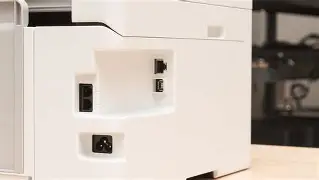
- Clearance: Allow extra room behind and above the printer for the rear feed and scanner lid. A cramped setup makes media handling and maintenance awkward.
- Surface protection: Filling ink tanks can be messy; keep absorbent paper or a cloth nearby and avoid placing the unit on fabric that could stain.
- Power source: Use a grounded outlet and avoid shared surge-prone strips—consistent voltage helps prevent mid-job interruptions.
- Network reach: If connecting over Wi‑Fi, verify the chosen location has strong coverage.
Step-by-step setup
1. Unboxing and physical assembly
Remove all shipping materials and tape. Inspect the printhead carriage and the paper path to ensure no packing foam remains. Open the ink tank compartment and remove any protective seals or plugs that prevent ink from flowing during transport.
2. Filling the tanks
Refillable ink tanks require care during the first fill. Follow these best practices:
- Work on a protected surface with gloves if preferred. Place a towel beneath the ink bottles during filling.
- Open the designated tank caps and fill to the indicated level—do not overfill. Most Ecotank-like models have fill marks or windows to show levels.
- Close caps securely to avoid spills and allow the printer a moment to stabilize if any air was introduced into the lines.
- Keep the ink bottles upright; store opened bottles per manufacturer guidance (some inks can be stored upright in a cool place for months).
3. Powering up and initial priming
After filling, power the unit. The printer usually runs a priming cycle to draw ink into the printhead. It may take several minutes and produce audible mechanical noise—this is normal. Do not interrupt the cycle by powering off or opening covers.
4. Software and driver installation
Install the latest drivers and utilities. For best results:
- Download drivers from the official support page for the Ecotank Et 15000 (or use the included disc where applicable), ensuring compatibility with the operating system version.
- Opt for full software bundles if scanning and maintenance utilities are required.
- Install any firmware updates that appear during setup; firmware updates often resolve early compatibility and reliability issues.
5. Network and mobile printing configuration
Connect via Wi‑Fi or Ethernet as supported. For Wi‑Fi setup, either use WPS (if available and secure) or the printer’s on-device setup menu to enter a network password. For mobile printing:
- Enable and test AirPrint, Mopria, or the printer manufacturer’s mobile app for printing from phones and tablets.
- Secure the printer on the network—set administrative passwords if supported and keep firmware current to avoid vulnerabilities.
6. First test prints and calibration
Run the manufacturer’s alignment and nozzle-check utilities, typically accessible from the control panel or software. Evaluate these tests for any banding, missing colors, or alignment issues. If print quality is subpar, run the recommended head cleaning cycle—avoid repeated cleanings because they consume ink.
Detailed product analysis: strengths and practical trade-offs
Ecotank-style models aim at predictable running costs and convenience for volume printing. The Ecotank Et 15000 excels in certain scenarios and has caveats in others. Below is an analysis of the key aspects owners commonly care about.
Running cost and ink economics
The central financial advantage is the low cost per page. For frequent color printing (documents, brochures, classroom handouts), the savings compound quickly. Buyers who print a few pages per week may not recoup the higher initial price as quickly, so calculating expected monthly output against the price of bottled ink is essential when evaluating value.
Discover deals on Electronics — updated daily.
Shop Amazon →Print quality and speed
These printers typically produce very good text and acceptable to excellent photo output depending on the ink set and paper used. Speed varies by mode—draft speeds are fast, while high-quality photo modes are slower. Real-world users who value crisp office documents and occasional photo prints will find the balance favorable; demanding professional photo labs still often prefer dedicated dye/sublimation or pigment photo printers.
Maintenance and long-term reliability
Refillable systems reduce waste but require owners to adopt a few consistent habits: use the printer regularly to prevent nozzle clogging, choose the correct paper and profiles for color work, and perform occasional printhead maintenance. Long periods of inactivity can increase the need for cleaning cycles, which use ink and time.
Environmental and practical considerations
Less frequent cartridge disposal is a plus for sustainability-minded buyers. Refillable bottles reduce plastic waste, and the lower resource consumption per printed page also lowers the carbon footprint associated with consumables over time.
Pros & Cons
- Pros
- Significantly lower running cost per page compared to cartridge systems
- Large ink reservoirs reduce the frequency of refills
- Good text quality and strong color output for everyday printing
- Lower plastic waste versus single-use cartridges
- Convenient for home offices, small businesses, and classrooms
- Cons
- Higher initial purchase price than basic cartridge printers
- First-time ink filling can be messy or intimidating to some users
- Requires regular use or maintenance to prevent nozzle clogging
- Not always the fastest option for very high-volume professional print shops
- Refilling with third‑party inks can void warranties or affect print quality
Comparison table: Ecotank Et 15000 vs printer categories
| Ecotank Et 15000 | Traditional cartridge inkjet | Monochrome laser | |
|---|---|---|---|
| Initial cost | Moderate to high | Low to moderate | Moderate to high |
| Running cost (per page) | Low | High | Low for mono, high for color laser |
| Print quality (text) | Excellent | Good | Excellent |
| Print quality (photos) | Very good for casual/photo prints | Good to very good | Poor (unless color laser) |
| Speed | Moderate | Moderate | Fast (mono) |
| Maintenance | Occasional head cleaning; refill management | Replace cartridges | Toner replacement; less frequent cleaning |
| Best for | High-volume color/document printing for cost-conscious users | Low-volume users who print occasionally | High-volume mono printing in offices |
Real-world use cases
Understanding how the Ecotank Et 15000 performs in typical scenarios helps set expectations.
Home office and remote workers
For a home office printing invoices, project drafts, and occasional marketing materials, this model reduces the worry about frequent cartridge replacements. Mobile printing and wireless setup simplify shared access across devices.
Small businesses and micro-entrepreneurs
Shops that produce flyers, labels, and short-run marketing collateral benefit from predictable ink costs and the convenience of large ink tanks. In a low-to-medium volume environment, the unit reduces operational interruptions from cartridge depletion.
Education and community centers
For classrooms and resource centers that print handouts, worksheets, and color activities, the reduced per-page cost is a major advantage. Staff should be briefed on basic maintenance to reduce downtime.
Photography hobbyists
Casual photographers who print family photos and proof prints will appreciate the color output, but those who demand gallery-grade prints might still prefer a dedicated photo printer or lab for final prints.
Buying guide: what to check before purchasing
Before deciding, evaluate the following criteria against one’s expected usage patterns and constraints.
1. Monthly print volume
Estimate average monthly pages. If printing more than a few hundred color pages monthly, an Ecotank-style printer usually offers better long-term economics than cartridges.
Discover deals on Electronics — updated daily.
See Deals →2. Color versus mono needs
If most printing is monochrome, compare a monochrome laser’s speed and cost against the Ecotank model. For mixed color and text workloads, the Ecotank approach often wins.
3. Supported media and paper sizes
Confirm the printer supports the paper sizes needed (A4, legal, envelopes, photo sizes). Some models provide rear-feed trays for thicker media or specialty paper—verify this if printing labels or cardstock.
4. Connectivity and software
Look for robust driver support for all operating systems in use, stable Wi‑Fi or Ethernet, and mobile printing standards. If scanning and document management are important, ensure the scanner’s resolution and speed meet needs.
5. Duplexing and automatic document feeder (ADF)
Automatic duplex printing saves paper for two-sided documents. An ADF accelerates multi-page scanning and copying—essential in small office workflows.
6. Warranty and support
Check warranty length and what it covers—particularly coverage around printheads and ink systems. Some manufacturers offer extended support or on-site service for business customers.
7. Ease of refilling and ink availability
Confirm the bottle design is secure and easy to use. Verify that replacement ink bottles are readily available in the local market or through reputable online channels (noting the manufacturer’s guidance on third-party inks).
8. Noise, footprint, and energy use
For quiet environments, compare measured noise levels or user reports. Also confirm physical footprint for the intended location and energy-saving features such as sleep mode.
Troubleshooting common issues
Several recurring issues have straightforward fixes:
- Nozzle clogs: Run a nozzle check and perform a targeted head cleaning. If clogs persist, run a deeper cleaning cycle and print a series of color-rich documents to re-wet the nozzles.
- Ink not recognized: Ensure tanks are seated and caps closed; some models require a priming sequence after refill to register the ink level.
- Paper jams: Remove paper gently following the path indicated in the manual; avoid yanking paper as sensors can be damaged.
- Wi‑Fi dropouts: Reposition the router or printer for better signal, assign a static IP if network instability persists, and update firmware.
- Color shifts: Use the correct paper profile and avoid mixing ink batches; perform color calibration where available.
Accessories and supplemental suggestions
- High-quality multipurpose and photo paper for best results.
- Surge protector to prevent damage from power spikes.
- Spare ink bottles stored per manufacturer instructions for uninterrupted operation.
- Maintenance kit or cleaning supplies recommended by the manufacturer if heavy use is expected.
Conclusion
The Ecotank Et 15000 represents a compelling choice for anyone who prints regularly and values predictable running costs, reduced waste, and convenience. Its refillable-tank architecture is particularly advantageous for small businesses, home offices, and organizations that produce frequent color materials. Successful ownership depends on following careful setup steps—correctly filling tanks, running initial priming cycles, installing updated software, and adopting light maintenance habits to prevent nozzle clogs. By assessing monthly volume needs, connectivity, and media support beforehand, buyers can determine whether the Ecotank-style approach aligns with their priorities. With routine use and sensible care, this class of printer typically delivers reliable performance and meaningful long-term savings.