Spec Battle: Msi Prestige 13 Ai Plus vs Samsung Galaxy Book6 Pro — Is It Worth Upgrading?
Introduction
Thin-and-light Windows laptops have entered a new phase where “performance” is no longer just about CPU speed—it is also about efficiency, screen quality, portability, and increasingly, on-device AI acceleration. For shoppers comparing premium ultraportables, two names stand out in very different ways: the MSI Prestige 13 AI+ (Plus) and the Samsung Galaxy Book6 Pro.
At a glance, both aim at the same audience—people who want a high-end laptop for work, school, and travel—but they arrive there with different priorities. MSI’s approach is extreme mobility: a full Windows laptop that feels almost weightless while still including useful ports. Samsung’s approach is a “do-everything premium notebook” with a large, vivid AMOLED touchscreen, strong performance, and deep ecosystem features (especially if the buyer already uses Galaxy devices).
This article breaks down what matters in real-world buying decisions—typing comfort, display usefulness, travel friendliness, battery expectations, ports, and performance for common workflows—then answers the upgrade question honestly: who should move to one of these models, and who should keep what they have?
Quick spec snapshot (what each laptop is trying to be)
| Category | MSI Prestige 13 AI+ (Plus) | Samsung Galaxy Book6 Pro |
|---|---|---|
| Core identity | Ultra-light productivity ultrabook with surprisingly complete ports | Premium “pro” notebook emphasizing AMOLED touch, performance, and ecosystem |
| Screen | 13.3" 2880×1800 OLED (high contrast, sharp for text and creative preview) | 14" or 16" Dynamic AMOLED 2X touch, 30–120Hz adaptive refresh, up to ~1000 nits HDR claim |
| CPU class | Intel Core Ultra Series 3 options; commonly seen with Core Ultra 7 355 | Intel Core Ultra Series 3 (e.g., Ultra 7 356H; higher configs referenced in reviews) |
| Battery positioning | Smaller battery (53.8Wh listed), optimized for portability | High-capacity batteries (67.18Wh 14", 78.07Wh 16" listed), marketed for long playback |
| Weight | 0.899 kg (about 1.98 lb) class portability | 16" model around 3.50 lb in review specs; 14" is typically lighter (varies by config) |
| Ports vibe | “No dongle” friendliness for a 13": TB4, HDMI, USB-A, microSD | Also “no dongle” leaning: TB4, USB-A, HDMI 2.1, audio jack (per review specs) |
MSI Prestige 13 AI+ (Plus): Detailed review and analysis
Design and portability
The Prestige 13 AI+ is built around a single, compelling promise: serious Windows productivity in an almost unbelievably light chassis. MSI lists the weight at 0.899 kg, and independent reviewers highlight the same “barely-there” feel in daily carry. That matters more than most buyers expect until they live with it—especially for commuters, frequent flyers, students crossing campus, or anyone tired of hauling a charger and a heavy laptop everywhere.
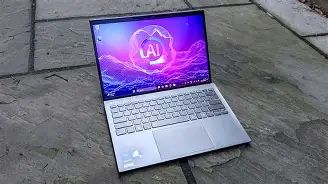
Portability, though, is not just weight. It is also how easily the laptop fits into a small bag, how stable it feels on a cramped tray table, and how much “setup friction” exists when opening it in a meeting. The Prestige 13 AI+ plays to those realities well: it is compact, quick to deploy, and generally designed to reduce travel hassle.
Display: OLED sharpness in a productivity size
MSI pairs the 13.3-inch form factor with a 2880×1800 OLED panel. In practical use, that translates into:
- Very crisp text at comfortable scaling (useful for long writing sessions, research, coding, and spreadsheets).
- Excellent contrast for movies, photo viewing, and dark UI themes.
- Wide color coverage claims (100% DCI-P3 is listed for certain configs), which is attractive for light creative work and accurate previewing.
The trade-off is that OLED can be less forgiving for always-on static elements (taskbars, app chrome) over many years, and buyers who keep laptops for a long time may want to use reasonable brightness, enable hiding taskbars, and vary wallpapers. For most people, the immediate benefit—high perceived quality and readability—is what they will notice daily.
Keyboard, touchpad, and “daily comfort”
For buyers who type a lot, comfort is often the real decider. Thin laptops can feel cramped or “clicky,” yet the Prestige 13 AI+ is generally described as having a solid typing experience given its size. That said, a 13-inch chassis naturally limits palm rest room and key spacing compared with a 14-inch or 16-inch system. People coming from a larger laptop should expect an adjustment period.
The upside of the smaller footprint shows up in real life: it is easier to use on laps, in coffee shops, or in tight desks. The downside is reduced room for a giant touchpad. Most users will still be fine, but power users who rely heavily on touchpad gestures all day may prefer the bigger surface area typically found on Samsung’s larger chassis.
Ports: unusually complete for an ultra-light 13-inch
One of the strongest practical advantages of the Prestige 13 AI+ is that it does not force a “dongle lifestyle.” MSI lists the following I/O on the A3M configuration:
- 2× Thunderbolt 4 (DisplayPort / Power Delivery)
- 2× USB-A (USB 3.2 Gen 1)
- HDMI 2.1 (listed with 8K@60 / 4K@120 capability)
- microSD card reader
- 3.5mm combo audio jack
That combination is rare in this weight class, and it matters for real workflows: presenting over HDMI in conference rooms, quickly importing photos via microSD, plugging in a USB-A security key, or connecting to older peripherals without hunting adapters.
Performance and AI: what it means in common workloads
Prestige 13 AI+ models commonly appear with Intel Core Ultra Series 3 CPUs (for example, configurations listing a Core Ultra 7 355), and MSI highlights NPU capability for on-device AI. In practical terms, most buyers should translate “AI PC” marketing into a simple expectation: good responsiveness under multitasking and an increasing number of apps that can offload AI tasks (background blur, noise reduction, certain creative features) to the NPU with less battery drain than brute-forcing everything on the CPU/GPU.
For typical productivity work—Office apps, web-heavy workflows, Teams/Zoom calls, PDF review, and light photo editing—the Prestige 13 AI+ should feel fast. Where compact ultrabooks can fall short is sustained heavy load: long video encodes, large batch exports, or heavier 3D work. With a very thin chassis, thermals and sustained wattage often matter more than peak benchmarks.
Looking for the best Laptops & Computers deals on Amazon?
Browse Now →Battery: portability-first compromise, not a marathon battery monster
MSI lists a 53.8Wh battery on the Prestige 13 AI+ A3M spec page. That is not tiny, but it is meaningfully smaller than the capacity Samsung lists on the Book6 Pro. In real-world use, buyers should expect a “solid day” depending on brightness and workload rather than a multi-day machine.
Battery expectations should also be grounded in how people actually use laptops:
- OLED + high resolution can raise power draw at higher brightness levels.
- Video calls (camera + mic processing + Wi-Fi + constant CPU work) are often more demanding than casual browsing.
- Browser tab overload is one of the most common silent battery killers for modern users.
For travelers, the saving grace is that USB-C PD charging (and the inclusion of Thunderbolt ports) makes it easy to top up with compact chargers—though MSI’s listed adapter varies by configuration and region.
MSI Prestige 13 AI+ pros & cons
- Pros
- Extremely light (0.899 kg class), ideal for daily carry and travel
- Sharp 2.8K OLED looks premium for text and media
- Unusually good port selection for the size (TB4, HDMI, USB-A, microSD)
- Modern wireless (Wi‑Fi 7 listed on specs)
- Cons
- Smaller battery capacity than many premium competitors (53.8Wh listed)
- 13-inch chassis can feel cramped for spreadsheet-heavy or split-screen work
- As with many ultra-thin laptops, sustained heavy workloads may be less comfortable than on larger systems
Samsung Galaxy Book6 Pro: Detailed review and analysis
Design and the “premium everyday workstation” approach
Samsung’s Galaxy Book6 Pro leans into the “premium Windows laptop” identity: aluminum build, thin profile, and strong emphasis on display quality and convenience features. It is positioned as a notebook that can be a primary machine for many buyers—good for productivity, media, light creative work, and even some casual gaming thanks to integrated Intel Arc graphics improvements.
The important real-world point is size choice. Samsung sells 14-inch and 16-inch variants, and that decision changes the experience dramatically:
- The 16-inch model is better for multitasking, timelines, spreadsheets, and side-by-side documents.
- The 14-inch model typically balances portability with enough screen space for most people who use scaling wisely.
For many upgraders, the screen size alone is the “worth it” factor—especially if they are currently on a 13-inch laptop and frequently feel constrained.
Display: Dynamic AMOLED 2X touch with adaptive refresh
The Galaxy Book6 Pro’s headline feature is the Dynamic AMOLED 2X touchscreen with an adaptive 30–120Hz refresh range (as described by Samsung), and very high HDR brightness claims (up to around 1000 nits in HDR scenarios). In everyday terms, this can mean:
- Smoother scrolling and pen/touch interaction (where supported), especially at 120Hz.
- Better power efficiency than a fixed 120Hz panel when the system drops refresh rate during static viewing.
- Excellent contrast and color for content consumption and photo/video preview.
Touch support is not a necessity for everyone, but it becomes surprisingly useful in certain situations: quickly scrubbing a timeline, tapping UI elements during presentations, pinching to zoom on documents, or interacting with Windows’ touch-friendly controls when using the laptop in tight spaces.
Performance: Intel Core Ultra Series 3 and integrated Arc graphics
Samsung positions the Book6 Pro around Intel’s newer Core Ultra platform (Series 3). On its product page, Samsung highlights Core Ultra Series 3 processors and references an NPU capable of meaningful TOPS performance, while reviews discuss strong responsiveness and improved integrated graphics.
For typical buyers, performance should be thought of in workflow categories:
- Office and browser-heavy work: fast, smooth, and unlikely to bottleneck.
- Creative “light pro” work: photo editing, short video edits, and basic motion projects should be comfortable, especially with higher RAM configs.
- Gaming: still not a dedicated GPU laptop, but modern integrated graphics can handle many esports and older AAA titles at sensible settings; buyers should keep expectations realistic.
The more meaningful difference for many users is not peak speed—it is how well the laptop sustains performance without getting annoyingly hot or loud. Samsung discusses upgraded cooling (including vapor chamber on some models) as part of the Book6 Pro design story.
Battery: capacity advantage and marketing vs reality
Samsung markets the Galaxy Book6 Pro with up to 30 hours of video playback, and lists battery sizes of 67.18Wh (14-inch) and 78.07Wh (16-inch) (typical). That capacity advantage is real compared with MSI’s 53.8Wh listing, but buyers should interpret “up to” carefully:
- Video playback tests are often done under controlled conditions (lower brightness, local playback, limited background tasks).
- Real productivity—video calls, heavy web use, external monitors, high brightness—will reduce runtime significantly.
Still, in practical terms, the Book6 Pro’s bigger batteries and adaptive refresh display can translate to a more relaxed day where the buyer is less anxious about finding outlets. For many professionals, that peace of mind is worth paying for.
Discover deals on Laptops & Computers — updated daily.
Shop Amazon →Ports and expandability: better than many thin laptops
Modern buyers often want a laptop that works with external monitors and peripherals without turning the desk into a dongle nest. Review specs for the Book6 Pro list a port selection including 2× Thunderbolt 4, USB-A, HDMI 2.1, and a 3.5mm audio jack. Samsung also notes a storage expansion option/slot in its product Q&A, which can matter for people managing large media libraries or project files.
Samsung Galaxy Book6 Pro pros & cons
- Pros
- Outstanding AMOLED touchscreen experience with adaptive 30–120Hz refresh
- Size options (14" or 16") to match buyer priorities
- Larger battery capacities (67.18Wh / 78.07Wh listed) and fast charging claims
- Strong all-around performance for productivity and “light pro” creative work
- Galaxy ecosystem features can be genuinely convenient for Samsung phone/tablet owners
- Cons
- Not a dedicated-GPU machine; heavy creators may need more graphics headroom
- The 16" version is less travel-friendly than ultra-light competitors
- Some preloaded ecosystem software may feel redundant for non-Samsung users
Head-to-head: what matters for real buyers
1) Travel and commute: weight is a feature
If the laptop is carried daily, weight becomes a quality-of-life upgrade that is hard to un-feel once experienced. MSI’s 0.899 kg class weight is a standout for frequent travel. Samsung’s Book6 Pro (especially the 16-inch) is more of a “bring it confidently” laptop than a “forget it’s in the bag” laptop. If the buyer frequently travels with a camera, books, or a second device, the MSI’s advantage compounds quickly.
2) Multitasking and screen real estate: size wins
For spreadsheet-heavy work, research with lots of windows, editing timelines, or anyone who routinely uses split-screen, the Galaxy Book6 Pro—particularly the 16-inch—often provides the better daily experience. More screen space reduces context switching, which is a hidden productivity cost many people don’t notice until they upgrade.
3) Ports and “meeting readiness”
Both are better than many thin laptops, but MSI’s inclusion of microSD and multiple USB-A ports in a 13-inch ultra-light chassis is especially useful for photographers, travelers, and presenters. Samsung’s port set is also practical, and Thunderbolt makes docking easy; the decision often comes down to whether the buyer frequently uses microSD or multiple legacy USB-A devices.
4) Battery expectations: capacity, display behavior, and workload reality
Samsung’s larger battery sizes and adaptive refresh strategy can provide longer untethered time for many users. MSI’s smaller battery is the predictable trade-off for extreme weight savings. Buyers should make this decision based on their actual day:
- If the buyer spends hours in video calls or often works at high brightness, the Book6 Pro’s capacity advantage is meaningful.
- If the buyer typically has access to charging (office, classroom, home, coffee shops) and values portability most, MSI’s trade-off is easier to accept.
5) Ecosystem: an underrated reason upgrades feel “worth it”
For Samsung phone owners, the Book6 Pro’s ecosystem integrations (calls/texts on PC, file sharing, multi-device continuity features) can reduce friction daily. For non-Samsung users, those features may matter little, and the MSI becomes more appealing as a “pure Windows ultrabook” choice focused on core laptop fundamentals.
Buying guide: Is it worth upgrading, and which one fits which buyer?
Buy the MSI Prestige 13 AI+ (Plus) if…
- The buyer’s top priority is maximum portability without giving up practical ports.
- The buyer works in many locations (office, home, client sites, travel) and wants a laptop that feels effortless to carry.
- The buyer values a sharp OLED for reading, writing, and media in a compact footprint.
- The buyer frequently uses HDMI presentations or microSD media imports and wants to minimize dongles.
Buy the Samsung Galaxy Book6 Pro if…
- The buyer wants a premium AMOLED touchscreen experience with adaptive high refresh for fluidity.
- The buyer benefits from more screen space (especially the 16-inch) for multitasking, creative apps, or long document work.
- The buyer is sensitive to battery anxiety and wants a laptop built around larger battery capacity.
- The buyer already owns Galaxy devices and will use ecosystem continuity features regularly.
When upgrading is genuinely worth it
Upgrades feel worthwhile when they remove daily friction. For most buyers, that friction falls into a few buckets:
- The current laptop feels heavy and discourages bringing it along (upgrade to MSI can be transformative).
- The current laptop feels cramped for work (upgrade to the Book6 Pro, especially 16-inch, can increase comfort and speed).
- The current screen is dull or low-contrast (either OLED option will feel like a major leap).
- The current laptop’s battery is unreliable due to age or low capacity (Book6 Pro’s larger batteries may be more reassuring).
- Ports are constantly missing in real life (both improve on many thin competitors; MSI stands out for microSD + USB-A count in a tiny chassis).
When upgrading may not be worth it
It may be smarter to hold off if the buyer’s current laptop already has a good OLED/IPS panel, enough performance for daily tasks, and acceptable battery life. Many people overestimate how much faster a new ultrabook will feel in basic web-and-office workflows. If the existing system is not causing real friction—slowdowns, poor battery health, painful port limitations, or an unpleasant screen—then an upgrade could be more about “want” than “need.”
Conclusion
The MSI Prestige 13 AI+ (Plus) and Samsung Galaxy Book6 Pro both represent the current best of premium Windows ultraportables, but they solve different problems. MSI is the better answer to a clear pain point: carrying a laptop should not feel like carrying luggage. It delivers a remarkably light chassis without sacrificing the ports that make a laptop practical in meetings, travel, and creative side tasks.
Samsung’s Galaxy Book6 Pro is the better choice when the buyer wants the laptop to feel like a high-end workstation for everyday life: a striking AMOLED touchscreen, stronger “big-laptop” comfort (especially at 16 inches), and battery and ecosystem conveniences that can make the entire day smoother.
Whether upgrading is worth it depends less on raw specs and more on what the buyer does all week. For frequent travelers and minimalists, the MSI can feel like the upgrade that changes habits. For multitaskers, creators, and Samsung ecosystem users, the Book6 Pro can feel like the upgrade that changes how enjoyable (and efficient) work is.