Don't Buy the C2 Oled Until You Read This Full Analysis
The C2 OLED has been one of the most talked-about TVs among home theater enthusiasts, gamers, and everyday buyers. On paper it promises the classic benefits of OLED — perfect blacks, wide viewing angles, and near-instant pixel response — in a range of sizes that fit living rooms and bedrooms alike. But a purchase like this is rarely just about a spec sheet. This analysis walks through what the C2 OLED actually delivers in real-world use, where it shines, where compromises exist, and how to decide whether it is the right television for a particular buyer.
Introduction: Who should care about the C2 OLED?
The people who care most about the C2 OLED fall into a few categories: cinephiles who prioritize contrast and color fidelity for movies; console and PC gamers looking for low input lag and HDMI 2.1 features; and buyers who want a premium, thin TV that looks as good mounted on a wall as it does on a stand. At the same time, households with heavy daytime TV viewing in bright rooms, or buyers who are very risk-averse about long-term image retention, will want to weigh the trade-offs carefully.
This article examines performance, features, and practical considerations — including burn-in risk mitigation, calibration needs, and how the C2 behaves in bright vs dark environments — to give a rounded perspective before making a purchase decision.
Detailed product review and analysis
Design and build
The C2 OLED follows the aesthetic conventions of modern premium TVs: a very thin panel, narrow bezels, and minimalist stand options. The lightweight chassis makes wall mounting straightforward, and the industrial design tends to blend into living spaces rather than dominate them. The one practical benefit of the thinness is a reduced viewing distance when wall-mounted — ideal for users who want the screen to sit close to the wall like a framed picture.
Panel technology and picture quality
At its core, the C2 uses an OLED panel with individually self-emissive pixels. That architecture delivers true black levels — pixels that switch off entirely — producing infinite contrast ratios that LCDs cannot match. For movies and high-quality streaming HDR content, the result is deep blacks, excellent shadow detail, and a natural-looking image with wide color gamut coverage. Skin tones and subtle gradients typically look more accurate on OLED than on most LED-backlit displays.
HDR highlights on OLED are impressive for content with localized bright details, but buyers should set expectations: OLED’s peak brightness is usually lower than the brightest LED and mini-LED LCDs. In living rooms with very bright sunlight, an OLED will generally not appear as punchy as a top-tier bright QLED or mini-LED TV. That said, in dim-to-moderately lit rooms the C2’s contrast and tone mapping deliver a cinematic experience that most viewers prefer.
Gaming and responsiveness
One of the C2’s strongest real-world selling points is its suitability for gaming. The panel offers fast pixel response times and low input lag at common resolutions and refresh rates, which translates to responsive controls and minimal motion blur in fast-paced titles. HDMI 2.1 features such as 4K at 120Hz, VRR (variable refresh rate), ALLM (auto low latency mode), and eARC (enhanced audio return channel) make it compatible with high-end consoles and gaming PCs. Competitive gamers who prioritize frame clarity and low latency will find the C2 compelling.
A note for PC gamers: the combination of low lag and support for G-Sync/FreeSync (depending on implementation) makes the C2 a good option as a big-screen monitor for both single-player and multiplayer gaming, provided they are comfortable with TV-size viewing distances and the inherent trade-offs of using a TV instead of a dedicated monitor.
Smart platform and usability
The C2 runs a modern smart TV platform with access to major streaming apps, voice assistants, and app ecosystems. The user interface has improved in recent iterations, but buyers should not expect a desktop-like app store: some niche streaming services or advanced media server features may require a separate device. Remote control ergonomics and responsiveness are generally good, and the TV supports typical convenience features such as input labeling, picture modes (Cinema, Filmmaker, Game, etc.), and basic picture controls for brightness, contrast, and color.
Audio
Built-in speakers on thin TVs are inevitably limited by physical constraints. The C2 provides better-than-basic TV sound with clear dialogue and decent dynamic range for casual viewing, but it does not replace a dedicated soundbar or AV receiver for immersive movie sound or deep bass. Buyers planning to use the TV as part of a home theater setup should budget for external audio if they want full-range sound and real surround effects.
Looking for the best TVs & Home Theater deals on Amazon?
Shop Amazon →Durability and burn-in considerations
OLED panels can be susceptible to burn-in (permanent image retention) under extreme conditions where static elements are displayed at high brightness for extended periods. In practice, most modern OLED TVs implement pixel-shifting, screen savers, logo-luminance detection, and other software-level protections to minimize risk. For typical mixed viewing patterns — movies, varied TV channels, gaming sessions, and occasional static UI elements — the risk is low but not zero.
Buyers who watch channels with persistent logos, use the TV as a PC monitor with static toolbars, or plan to run 24/7 signage should be cautious. For standard home use, following basic precautions (moderating maximum brightness, enabling built-in screen protection features, and varying content) keeps the risk acceptably low for the majority of users.
Real-world use cases: how the C2 performs in everyday scenarios
Movie nights and home cinema
For viewers who watch movies in a darkened room, the C2 delivers one of the best picture experiences at its price point. Deep blacks and accurate color rendering make it ideal for cinematic content. Coupling the TV with a soundbar or AV receiver and a comfortable seating distance will replicate a small theater experience.
Family living room with mixed lighting
In living rooms with large windows and strong daylight, the C2 still performs admirably for most content but will not match the brightness punch of the brightest mini-LED/LED rivals. If daytime TV, sports, and bright-room viewing are primary concerns, buyers should compare the C2’s performance in their specific environment before deciding.
Console gaming and next-gen titles
Console owners with a PS5 or Xbox Series X will appreciate 4K120 support, VRR, and low input lag. The C2 works very well for fast-action games, racing titles, and immersive single-player experiences. Competitive players who rely on ultra-high refresh rates might still prefer a gaming monitor, but most console gamers will be satisfied.
Using as a PC display
Using a large-screen TV as a PC monitor is attractive for productivity and creative work, but static UI elements can increase image retention risk. For occasional use and mixed tasks it is acceptable; for full-time desktop usage, a dedicated monitor with high refresh rates and anti-burn protections is generally a safer long-term investment.
Pros & Cons
- Pros:
- Exceptional contrast and true black levels for movies
- Excellent color accuracy and wide viewing angles
- Low input lag and strong gaming features (4K120, VRR, ALLM)
- Slim, attractive design that integrates well into living spaces
- Multiple size options to suit bedrooms, living rooms, and dedicated media rooms
- Cons:
- Lower peak brightness compared with the brightest mini-LED and QLED models (can matter in very bright rooms)
- Risk of burn-in with prolonged static content (mitigations exist, but risk is non-zero)
- Built-in speakers are good but not a substitute for a dedicated sound system
- Premium price relative to budget LED alternatives
Comparison: C2 OLED versus common alternatives
| Model | Panel Technology | Contrast | Peak Brightness | Best For | Gaming Features | Image Retention Risk |
|---|---|---|---|---|---|---|
| C2 OLED | OLED (self-emissive) | Exceptional — true blacks | High for OLED, but lower than brightest mini‑LEDs | Movies in dim/controlled lighting; console gaming | 4K@120Hz, VRR, ALLM, eARC | Low for mixed use; moderate if static content is common |
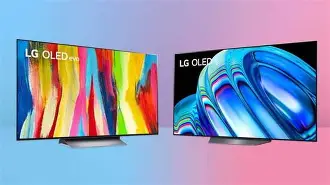
| G2 OLED (OLED evo) | OLED with brighter "evo" tuning | Exceptional — true blacks | Higher than standard OLEDs (better HDR highlights) | Bright-room HDR movie viewing; premium home cinema | Similar advanced gaming features | Low for mixed use; similar precautions advised |
| Samsung Neo QLED (e.g., QN90) | Mini‑LED LCD (backlit) | Very good (local dimming dependent) | Very high — excels in bright rooms | Bright living rooms, sports, general TV | 4K@120Hz on select ports, VRR | Minimal — LED panels do not have OLED burn-in concerns |
Buying guide: what to consider before choosing the C2 OLED
1. Room brightness and placement
Consider how much ambient light the TV will face. If most viewing happens in a dark or moderately lit room, the C2 will likely deliver superior perceived contrast and more cinematic HDR. For very bright rooms or wide windows with direct sunlight, an ultra-bright mini-LED or QLED model may hold advantages in highlight visibility and perceived vibrancy.
2. Primary use: movies vs sports vs gaming
If movies and streaming dramas are the main use, prioritize contrast and color — OLED excels here. For sports and daytime TV, look at brightness and anti-reflection performance. For gaming, confirm the TV’s supported input features (4K@120Hz, VRR, low input lag) and which HDMI ports provide them.
3. Viewing distance and screen size
Choose screen size based on distance and resolution. For typical 4K viewing, sitting closer than three times the screen height reduces perceived benefits of high resolution. Smaller rooms or multi-purpose rooms may be better served by the smaller C2 sizes, which preserve picture density at shorter distances.
Discover deals on TVs & Home Theater — updated daily.
See Deals →4. Burn-in risk and usage patterns
Evaluate how the TV will be used. Avoid buying OLED as a device for heavy static-content tasks (e.g., using it as a primary PC monitor with static toolbars, or running channel lineups with persistent logos all day). If usage includes significant static elements, consider alternatives or plan strict usage habits and enable the TV’s protective features.
5. Audio and accessories
Factor in the total cost of ownership: for a true home theater experience, budget for a soundbar or AV receiver. Also check for compatible wall mounts, cable management, and possible calibration services if the buyer values reference-level color accuracy.
6. Calibration and picture settings
Out-of-the-box picture modes favor punchy, eye-catching visuals for store floors. For accurate reproduction, choose cinema or expert modes and consider professional calibration or using calibration patterns with a meter for the best results. Many buyers will be satisfied with user mode tweaks; those seeking reference accuracy should plan for more detailed setup.
7. Warranty and service
Check the manufacturer warranty and any extended coverage options that may address panel issues. Some buyers opt for extended protection plans if they are concerned about potential panel defects or image retention over several years.
Practical recommendations and small print
Before committing to a purchase, prospective buyers should:
- See the TV in a familiar lighting environment if possible; a showroom demo under bright store lighting can be misleading.
- Ask about the exact HDMI feature support per port (not all ports always carry full-bandwidth HDMI 2.1 features across every model year).
- Plan for external audio if immersive sound matters; do not assume the built-in speakers will suffice for a cinema-grade experience.
- Use the TV’s built-in modes for burn-in protection and avoid leaving static high-contrast images on for extended stretches.
Conclusion
The C2 OLED is a compelling TV that offers some of the best contrast, color, and motion performance available in a consumer television — especially for dark-room movie viewing and high-fidelity gaming. It is not, however, a perfect fit for every buyer. Potential owners who spend long hours watching bright daytime television, display static content for extended periods, or require the absolute brightest HDR highlights may find more suitable trade-offs in mini-LED or QLED alternatives.
Ultimately, the decision comes down to intended use and environment. For the majority of home cinema enthusiasts and many gamers, the C2 provides a level of picture quality and responsiveness that is difficult to beat. For those prioritizing maximum peak brightness, zero risk of image retention, or the loudest possible integrated sound, it makes sense to compare side-by-side with bright-room alternatives and plan for external audio. Reading this analysis first clarifies those trade-offs so buyers can pick the TV that aligns with how they actually watch TV — not just how it performs under perfect lab conditions.